
Gaming laptops · Acer Nitro · Intel + NVIDIA
Acer Nitro V15 Review: a Core i7-13620H and an RTX 4050 in a 2.11 kg, 165Hz, fully upgradable budget gaming laptop (2026)
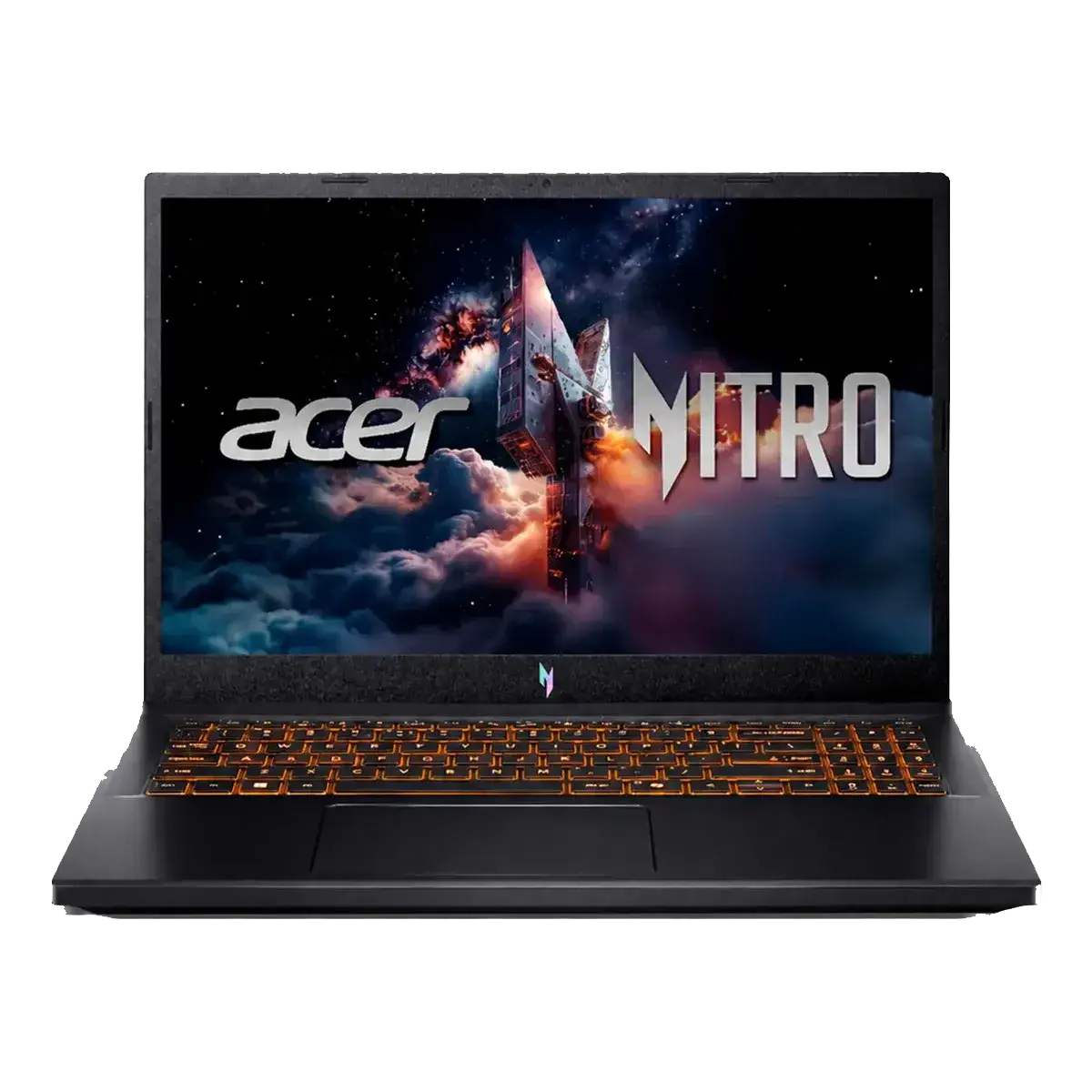
The Acer Nitro V15 is the laptop that shows up under almost every "gaming laptop under X" search, because Acer built the ANV15-52 family to hit exactly one brief: put a real RTX GPU and a high-refresh screen into a light, plastic, fan-cooled shell and price it for students and first-time PC gamers. This configuration, the ANV15-52-778T, is the one you will actually find on Brazilian shelves and on Mercado Livre: an Intel Core i7-13620H, an NVIDIA GeForce RTX 4050 Laptop GPU with 6GB of GDDR6 running at a 75W power limit, 8GB of DDR5-5200 memory, a 512GB PCIe 4.0 NVMe SSD, and a 15.6-inch 1920x1080 IPS matte panel refreshing at 165Hz. It also has the thing many budget gaming laptops throw away: two SO-DIMM slots and a second, empty M.2 socket.
Acer Nitro V15 in 30 Seconds
- What it is: a 2.11 kg entry-level gaming laptop with a Core i7-13620H (10 cores / 16 threads, 6 Performance + 4 Efficient, up to 4.90 GHz, 24 MB Smart Cache), an RTX 4050 Laptop GPU with 6GB GDDR6, 8GB of DDR5-5200, a 512GB NVMe SSD, Wi-Fi 6, RJ-45, HDMI 2.1 and a Thunderbolt 4 USB-C port. Listed at R$ 5,889.99.
- "Only 8GB of RAM?", the number every buyer asks about first Acer's official spec sheet for this exact SKU states 1 × 8GB SO-DIMM module, two slots, up to 32GB. So yes, it ships with 8GB, and yes, you can fix it. Adding one matched 8GB DDR5-5200 SODIMM gives you 16GB in dual channel, which is the difference between smooth and stuttery in 2026 games. Treat the extra module as part of the purchase price, not an optional extra.
- What the RTX 4050 really delivers, 2,560 CUDA cores, 6GB GDDR6 on a narrow 96-bit bus, 35–115W configurable, and Acer allows it 75W in this chassis. LaptopMedia measured a stable 74W draw, a 69°C GPU core and 131 fps in Counter-Strike 2 at 1080p Very High, and Tom's Hardware averaged 53.56 fps across fifteen straight ray-traced Metro Exodus runs. This is a comfortable 1080p High card, not an ultra card.
- The honest ceiling: 6GB of VRAM. NVIDIA's own specification lists DLSS Super Resolution and Frame Generation, and both lift frame rates a lot in supported titles (independent testing puts Cyberpunk 2077 from 32 fps with ray tracing to around 78 fps with DLSS Quality plus Frame Generation). But 6GB is the smallest buffer in the Ada family: keep texture quality at High instead of Ultra in the newest AAA releases, and remember Frame Generation itself costs VRAM.
- The screen is a gamer's screen, not a colour screen. 165Hz, IPS, matte, Full HD, 300 nits and roughly 27ms response, which is genuinely good for competitive play. Acer's spec sheet for this SKU lists 45% NTSC colour gamut, and LaptopMedia measured a comparable 165Hz panel at 54% sRGB. Fine for gaming and office work; not for photo or video colour grading.
- It does not come with Windows: this SKU ships with 64-bit Linux (Acer's custom AGP image). That is the single biggest reason it is cheaper than a machine with a Windows licence, and it is the part you must budget for: install Windows 11 yourself, bring a licence you own, or actually use Linux for gaming.
- Storage and ports are unusually generous: the 512GB drive is a PCIe 4.0 x4 M.2 2280, and there is a second free M.2 slot for another drive. On top of that you get Thunderbolt 4, HDMI 2.1, two USB-A 5Gbps ports (one always-on), gigabit RJ-45 and a full-size combo audio jack. A 720p webcam, no fingerprint reader, no card reader and no user-facing MUX switch.
- Battery and acoustics, honestly. Acer advertises up to 5 hours; reviewers measured less than 5 hours of light use and around 3.5 hours of mixed productivity, and roughly 1–2 hours of gaming on battery. Plan to carry the 135W adapter. Fan noise is mode-dependent: Notebookcheck measured 37 dB in Quiet, 49 dB in Balanced and 59 dB in Performance on this family.
- The perk Brazilian buyers notice immediately: an ABNT2 membrane keyboard with single-colour backlighting and a dedicated numeric keypad, a 135W bi-voltage INMETRO-certified adapter with a standard three-pin plug, and a one-year manufacturer warranty.
- Buy it if you want real 1080p gaming above 60 fps, a 165Hz screen, and a laptop you can upgrade twice. Skip it if you need a colour-accurate display, all-day battery life, silent fans, or you want the newest GPU generation, spend a little more and get an RTX 5060 or RTX 4060 laptop with 8GB of VRAM.
Full Specification Table. Acer Nitro V15 ANV15-52-778T
| Component | Specification (Acer official) | What it means for you |
|---|---|---|
| Model | ANV15-52-778T (part number NH.U1TAL.005), black | Match this full code when comparing listings: Acer reuses the ANV15-52 name across very different configurations |
| Processor | Intel Core i7-13620H, 13th gen (Raptor Lake), 10 cores (6 Performance + 4 Efficient) / 16 threads, up to 4.90 GHz, 24 MB Smart Cache, 45W base / 115W max turbo, Intel 7 | Enough CPU for 1080p gaming plus multitasking; the laptop's power envelope, not the chip, is what limits sustained clocks |
| Graphics | NVIDIA GeForce RTX 4050 Laptop GPU, 2,560 CUDA cores, 6GB GDDR6, 96-bit, 194 AI TOPS, boost 1605–2370MHz, 35–115W range (75W in this chassis), Ada Lovelace, DLSS Super Resolution + Frame Generation, NVENC 8th gen; Intel UHD integrated graphics | Confident 1080p High card with DLSS; 6GB of VRAM and a 96-bit bus are the hard limits on texture detail |
| Memory | 8GB DDR5 up to 5200 MHz, 1 × 8GB SO-DIMM, 2 slots, up to 32GB (16GB per module) | The most important upgrade on the machine; a matched second stick restores dual channel and 16GB |
| Storage | 512GB NVMe SSD, PCIe 4.0 x4, M.2 2280 + one free M.2 2280 slot (PCIe 3.0 x4, up to 1TB) | Fast drive plus room for a second one without trading tools, rare at this price |
| Display | 15.6" IPS LED, 1920x1080, 16:9, 165Hz, 300 nits, 1000:1 contrast, ~25–27ms response, 45% NTSC gamut, Acer ComfyView matte coating, 85° viewing angle | Excellent refresh rate for competitive play; the colour gamut is the cost of the price |
| Ports | 1 × Thunderbolt 4 / USB-C, 2 × USB-A 3.2 Gen 1 5Gbps (one always-on charging port), HDMI 2.1, RJ-45 1Gbps, 3.5mm combo audio, Kensington lock | Thunderbolt 4 at this price is rare and useful for docks, external storage and a second high-refresh monitor |
| Wireless and network | Wi-Fi 6 (802.11ax) dual-band 2x2 MU-MIMO, Bluetooth 5.1+, Gigabit Ethernet, Wake on LAN, WoL | No dongle needed for online gaming or a controller |
| Keyboard and touchpad | Backlit ABNT2 membrane keyboard, single colour backlight, dedicated numeric keypad; multi-gesture touchpad, moisture resistant | The Brazilian layout plus a numpad is a genuine daily-use win over ultrabooks |
| Audio and camera | 2 × 2W stereo speakers, 2 × microphones, 720p webcam at 30fps | Fine for calls and system sounds; use headphones or external speakers for games |
| Security | BIOS password, Kensington lock, firmware TPM (fTPM) | No fingerprint reader or physical camera shutter on this configuration |
| Battery and charger | 57Wh (3,574mAh, 4-cell): Acer quotes up to 5 hours; 135W bi-voltage 100–240V external adapter, INMETRO certified, three-pin plug | Real-world autonomy is light-use only; gaming performance is designed for the charger plugged in |
| Size and weight | 362.3 × 239.89 × 23.5 mm; 2.11 kg (4.66 lb) | One of the lighter gaming laptops at this price, realistic for a university bag or a commute |
| Operating system | Linux 64-bit (custom Acer AGP image), no Windows licence included | Factor a Windows licence into the price, or install it and use the hardware as a Linux gaming machine |
| Price at time of writing | R$ 5,889.99 on Mercado Livre. Below Acer's own Brazilian store, which lists the same machine at R$ 6,649.05 with Pix discount (R$ 8,999 list price) | The Linux configuration is the price advantage; compare like-for-like when shopping |
The RTX 4050 at 75W: What the Measurements Say
The single most important spec on this laptop is not in the spec sheet at all: it is the 75W power limit Acer gives this GPU. Laptop GPUs are sold as a range, not a fixed chip: the RTX 4050 Laptop GPU can draw anywhere from 35W to 115W according to NVIDIA's official specification, and the same card in a 45W laptop is measurably slower than the same card here. Tom's Hardware put this configuration head to head against the 45W RTX 4050 in the MSI Cyborg 15 and the Nitro won comfortably, while noting that Dell and Lenovo machines with a 100W-or-higher RTX 4060 were clearly faster still. LaptopMedia, testing this exact chassis, confirmed the headroom is well used: the RTX 4050 held an average clock of 2,459 MHz, drew an average of 74W, and over a full hour of gaming the GPU core peaked at 71°C with the memory at 92°C, an unusually stable result for a laptop, with no throttling to report.
In frame-rate terms this is a genuine 1080p card. LaptopMedia recorded 131 fps in Counter-Strike 2 at 1080p on Very High settings, exactly the kind of number the 165Hz panel can show. Tom's Hardware's fifteen consecutive ray-traced Metro Exodus runs averaged 53.56 fps with minimal variance between passes, which is the kind of consistency that matters more than a headline peak: your 1% lows stay close to your average. Notebookcheck, measuring the same RTX 4050 at the same 75W inside the same Nitro chassis, put The Witcher 3 at roughly 78 fps in Balanced and 82 fps in Performance at Full HD Ultra. For AAA titles, PCVarge measured the Nitro V 15 RTX 4050 at around 51 fps in Cyberpunk 2077 at 1080p Ultra, and around 63 fps with ray tracing and DLSS off at High. Independent RTX 4050 testing puts competitive shooters above 100 fps at 1080p High and most single-player titles in the 45–70 fps band at 1080p Medium-to-High, with DLSS Quality lifting demanding releases comfortably past 60.
There is one hardware ceiling you cannot upgrade, and it is the 6GB of VRAM on a 96-bit bus, the narrowest memory interface in NVIDIA's Ada laptop line. At 1080p Medium and High it is genuinely enough. Push Ultra textures plus ray tracing in the newest UE5-era releases and you cross the limit, and the result is not a lower frame rate but memory spill-over into system RAM and irregular stutters that no settings slider fully fixes. Two habits solve almost all of it: keep texture quality at High, and remember that Frame Generation is not free, it consumes VRAM itself, so on the heaviest titles turning it on can move the bottleneck rather than remove it. If you want the same GPU design with less ceiling anxiety, the step up is an RTX 4060 or RTX 5060 laptop with 8GB.
Expected Performance by Game Type
| What you play | Settings | Expected result at 1080p |
|---|---|---|
| Competitive shooters (CS2, Valorant, Fortnite) | High to Very High | Excellent, around 130 fps in CS2 on Very High per LaptopMedia; the 165Hz screen is fully used |
| Current AAA action (Cyberpunk 2077, Black Myth: Wukong) | High without ray tracing | Around 60–65 fps. The practical default for this card |
| Ray-traced AAA | High textures + DLSS Quality + Frame Generation | Playable and often above 60, but watch VRAM: turn textures down to High before enabling Frame Generation |
| Older or optimised AAA (Metro Exodus Enhanced, Shadow of the Tomb Raider, Assassin's Creed) | High to Ultra | Comfortable 60–70 fps |
| Esports with 144+ Hz ambitions | Low with DLSS Performance | Workable, but a 100W+ GPU is the honest way to break 200 fps |
| 1440p or 4K | Any | Not the target for this class of GPU, stick to the native 1080p panel |
| Creative work (light video editing, 3D, Blender) | - | Fine for school and light editing; the 6GB buffer and the 45% NTSC panel rule out colour-critical work |
The 8GB RAM Question, Answered Honestly
This is the doubt that decides the purchase, so it deserves a straight answer rather than a marketing line. Acer's official spec for the ANV15-52-778T reads: 8GB DDR5 up to 5200 MHz, one 8GB SO-DIMM module, two slots, expandable to 32GB. Two facts follow from that single line. First, the laptop is fixable, the memory is in sockets, not soldered, so you can take it to 16GB or 32GB in minutes with a screwdriver. Second, as shipped, 8GB of DDR5 on a single module means single-channel memory, and that is the least useful way to run this platform.
Why does 8GB fail the way it does? Because modern titles do not degrade gracefully. Windows 11 itself consumes 2.5–3.5GB before you launch anything, a current AAA game typically allocates another 8–15GB, and once the pool is exhausted Windows starts paging to the SSD, which is 10–50 times slower for random access. The symptom is not a lower average frame rate; it is unpredictable micro-stutters during asset-heavy scenes, which is far more damaging in a competitive match than a flat 55 fps. Independent 2026 testing is consistent on this point: 16GB is the minimum for a serious gaming machine, and matched dual-channel sticks improve 1% lows far more than average frame rates, often by double digits, with average frame rates moving roughly 3–8% in bandwidth-sensitive titles. That is why "add a matched 8GB stick" beats "add a 16GB stick" here: 8GB + 8GB in dual channel is the configuration that makes this laptop feel like a different machine, while 8GB + 16GB leaves the extra capacity running in single channel.
Budget accordingly. A matched 8GB DDR5-5200 SO-DIMM is inexpensive, and the second M.2 slot means storage is not a second expense. Add Windows to the same mental total and you have an honest, complete cost of ownership: which is exactly what makes this listing worth buying at the right price.
Upgrade Path: Memory and Storage Are Both Open
Most gaming laptops at this price give you one thing to change. This one gives you two. Acer documents a 512GB PCIe 4.0 x4 M.2 2280 drive in the first socket and a second M.2 2280 slot (PCIe 3.0 x4, up to 1TB) left empty, so total storage can reach roughly 1.5TB by adding a single drive instead of replacing anything. Brazilian reviewers measured the shipped SSD at close to 4,000 MB/s read and 3,800 MB/s write, properly fast, which keeps load times short even in storage-heavy open worlds.
What you cannot change is worth knowing too: the processor is soldered to the board, as it is on every modern laptop; there is no SD card reader; and there is no user-selectable MUX switch on the ANV15-5x family. Acer's community team has confirmed there is no known BIOS option for it, so the laptop runs its Optimus-based hybrid graphics routing rather than forcing the dGPU directly. None of that matters for 1080p gaming; all of it is worth remembering if you plan to run an external high-refresh monitor and want to bypass hybrid graphics.
The Display: 165Hz Is the Win, 45% NTSC Is the Cost
Acer's specification for this SKU lists a 15.6-inch IPS panel at 1920x1080, 165Hz, 300 nits, 1000:1 contrast, approximately 25–27ms response, matte ComfyView coating, 85-degree viewing angles and 45% NTSC colour gamut. Split that into two verdicts. For gaming, it is good: 165Hz is a real competitive advantage over the 144Hz and 60Hz panels on cheaper machines, the matte finish kills reflections in a bright room, and IPS gives you stable viewing angles for shared screens. PC Gamer, testing an ANV15-52 with the same 165Hz panel, described it as beautifully clean with no backlight bleed in their unit, while flagging that other reviewers have reported inconsistent panels within the family, which is covered by warranty if you get one.
For anything colour-critical, it is not. LaptopMedia measured a comparable 165Hz ANV15-52 panel at 54% sRGB coverage and called coverage the model's most significant compromise, describing the screen as unusable for creative work. If you edit photos, grade video, or design in colour, this is the reason to choose a different laptop, or to budget for a small external monitor with a proper sRGB panel, which is cheaper than finding the right notebook.
Cooling, Noise and NitroSense
The thermal story is one of this laptop's quiet strengths. LaptopMedia's one-hour GPU stress test found the RTX 4050 completely stable with no meaningful clock drop, and Canaltech's month-long use of a Nitro V15 with this CPU recorded gaming temperatures never exceeding 71°C, with the GPU around 65°C during play; only a synthetic Cinebench run pushed the CPU to 91°C, with the GPU hotspot staying below 80°C. Two fans handle the work, and the chassis is thin enough (23.5mm) that the result is genuinely cool for a gaming laptop.
Noise is the trade-off, and it is managed by NitroSense, Acer's control utility, which sets CPU power limits and fan behaviour across three profiles. Notebookcheck measured the same family in The Witcher 3 at Full HD Ultra and the numbers are worth knowing before you choose a mode:
| NitroSense mode | CPU power limit | Noise measured | The Witcher 3, 1080p Ultra |
|---|---|---|---|
| Quiet | 35W / 64W (PL1 / PL2) | 37 dB(A) | About 62 fps, use it for work, meetings and light games |
| Balanced | 45W / 115W | 49 dB(A) | About 78 fps, the sensible daily setting |
| Performance | 55W / 115W | 59 dB(A) | About 82 fps, buy headphones |
Reviewers across the English-language press are consistent that the fans are the loudest part of the package, and that Performance mode is audible across a room. Balanced is the right default; Quiet is genuinely useful for study and travel. One practical quirk to know: the NitroSense Performance profile is gated by battery level in some configurations, so a half-charged laptop can feel artificially slow until it is plugged in.
Battery Life, Build and Everyday Use
The 57Wh battery is the honest weak point. Acer advertises up to 5 hours depending on use, and that is the number you will see quoted everywhere, but it is measured in light workloads. Independent reviewers landed lower: LaptopMedia recorded under 5 hours, Canaltech measured 3 hours 31 minutes on a productivity simulation, and PCVarge found a little over 4 hours. Gaming on battery is realistically one to two hours, and performance is designed around being plugged in. That is normal for the category, but if you need a machine that survives a flight with work done, this is not it.
Day to day, the ergonomics are better than the spec list suggests. The ABNT2 keyboard has a dedicated numeric keypad, which no 13-inch laptop offers and which students, accountants and spreadsheet users notice immediately, and the single-colour backlight keeps it readable at night without the RGB theatre that some buyers dislike. The touchpad is a full-size multi-gesture unit. At 2.11kg and 23.5mm thick it is one of the genuinely portable gaming laptops, and the 135W bi-voltage INMETRO-certified adapter with a standard three-pin plug removes one more Brazilian-specific headache. Audio is average: two 2W speakers are fine for calls and system sounds, and reviewers are unanimous that a headset is required for games. The 720p webcam is adequate for classes and meetings, but there is no physical privacy shutter and no fingerprint reader on this configuration.
Linux Out of the Box: What It Costs and What It Saves
This exact SKU ships with 64-bit Linux using Acer's custom AGP image, and that single line explains a large part of its price advantage. It is the same reason the RTX 4060 version of the Nitro V15 sometimes appears at the same price as this one in Brazilian listings. There are three honest ways to handle it. Buy a Windows 11 licence and install it. The process is straightforward, Acer and Microsoft both support the hardware, and you gain access to the full DirectX 12 game library. Bring a licence you already own. Or use the Linux it ships with: the hardware is well supported, Proton runs Windows-only titles on Linux at near-native performance, and for a machine meant to game at 1080p High this is a defensible, free choice, as long as you are comfortable with it.
What you should not do is assume Windows is included and be surprised by the invoice. The price comparison below assumes you add it.
Price and How It Compares
At R$ 5,889.99 this listing sits below Acer's own Brazilian store, which lists the same ANV15-52-778T at R$ 6,649.05 with a Pix discount against an R$ 8,999 list price, that is unusual and worth acting on: the manufacturer direct channel is more expensive than the marketplace here. For context on what else is available in this range, Brazilian reviews of the Nitro V15 line note that the RTX 4060 version of the same laptop: same CPU, same memory capacity, same display specification, has been appearing at a similar price precisely because it also ships with Linux, while the Windows-equipped 16GB configuration of this RTX 4050 model has been quoted closer to R$ 7,650. The honest summary is that hardware pricing in Brazil is volatile and the Linux variants do most of the heavy lifting on price.
Judge the deal with two corrections applied. Add the matched 8GB RAM module, because you will need it. Add a Windows licence if you need one. Then compare the result against a machine that ships 16GB and a Windows licence already, if the corrected total lands close, take the version that is ready to use, and if the laptop with more VRAM falls within reach, that is the better long-term buy. What this configuration does offer, and what is genuinely rare below R$ 6,000, is a Core i7, a 75W RTX 4050, a 165Hz screen, Thunderbolt 4, two memory slots and two SSD sockets for one price.
Pros and Cons
Pros
- RTX 4050 allowed 75W, measured at 74W average draw, 2,459MHz sustained and a 69°C GPU core over a full hour of gaming
- 131 fps in Counter-Strike 2 at 1080p Very High, so the 165Hz panel is genuinely usable in competitive titles
- Consistent performance: 53.56 fps average across fifteen consecutive ray-traced Metro Exodus runs with minimal variance
- Cool and stable thermals for a gaming laptop, under 71°C during real games in month-long testing
- Two SO-DIMM slots and two M.2 sockets, so both memory and storage are upgradeable after purchase
- Thunderbolt 4, HDMI 2.1, gigabit Ethernet, Wi-Fi 6 and an always-on USB port at this price point
- Light and thin for the category at 2.11 kg and 23.5mm
- ABNT2 backlit keyboard with a dedicated numeric keypad, plus a bi-voltage INMETRO adapter with a three-pin plug
- Priced below Acer's own Brazilian store for the same model number
Cons
- Ships with only 8GB of DDR5 on a single SO-DIMM. Single channel, and a real bottleneck until you add a matched stick
- 6GB of VRAM on a 96-bit bus means Ultra textures plus ray tracing spill into system memory and cause stutter
- Display covers only 45% NTSC per Acer's specification, not suitable for colour-critical work
- Ships with Linux, so a Windows licence is an extra cost unless you plan to stay on Linux
- 57Wh battery delivers roughly 3.5–5 hours of light use and 1–2 hours of gaming
- Fan noise of 49 dB in Balanced and 59 dB in Performance is the loudest part of the package
- No fingerprint reader, no physical webcam shutter, no SD card reader and no user-selectable MUX switch
- Fully plastic chassis and a 720p webcam, as expected at this tier
- Acer reuses the ANV15-52 name across many configurations, check the full code before comparing prices
Frequently Asked Questions
Is 8GB of RAM enough for the Acer Nitro V15?
Not for how you will actually use it, and the good news is that the fix is cheap and easy. Acer's official specification for the ANV15-52-778T lists 8GB DDR5-5200 as one 8GB SO-DIMM module, with two slots supporting up to 32GB. Windows 11 alone uses 2.5–3.5GB and current AAA titles commonly allocate 8–15GB more, so as shipped the laptop pages to its SSD and produces irregular stutters rather than a clean frame-rate drop. Add one matched 8GB DDR5-5200 SO-DIMM and you get 16GB in dual channel, which is the configuration that fixes both the capacity and the memory bandwidth. Prefer adding 8GB over adding 16GB: 8GB + 8GB runs dual channel, while 8GB + 16GB leaves the extra capacity in single channel. The second module costs a fraction of the laptop and is the single highest-value upgrade you can make to it.
Does this model come with Windows installed?
No. This specific configuration, part number NH.U1TAL.005, ships with 64-bit Linux using Acer's custom AGP image, and no Windows licence is included. That is why it is priced below equivalent machines: the OS licence is genuinely missing, not hidden. You have three options: install Windows 11 yourself with a licence you buy or already own, keep the Linux image and use Proton for Windows-only games, or buy the machine knowing you will set it up your way. Acer supports the hardware on both platforms, and the RTX 4050 works in Linux games through the standard Vulkan and proprietary-driver paths, but budget for the licence if you plan to play the full Windows catalogue.
Is the RTX 4050 with 6GB of VRAM good enough in 2026?
At 1080p, yes, with one rule. NVIDIA's official figures for the GeForce RTX 4050 Laptop GPU are 2,560 CUDA cores, 6GB of GDDR6 on a 96-bit bus, and a configurable 35–115W power range; Acer allows it 75W here, which is the upper-middle of that range and measurably faster than a 45W version of the same card. Independent testing puts competitive shooters above 100 fps at 1080p High, most modern single-player titles in the 45–70 fps range at 1080p Medium-to-High, and with DLSS Quality plus Frame Generation the demanding ones move comfortably past 60. The rule is texture quality: 6GB is the smallest buffer in the Ada laptop family, so keep textures at High instead of Ultra in the newest releases, and be aware that Frame Generation consumes VRAM itself. If your priority is buying once and playing maximum settings for years, an RTX 4060 or RTX 5060 laptop with 8GB is the wiser target.
Can I upgrade the RAM and the SSD?
Both, and this is one of the machine's best features. Memory sits in two SO-DIMM slots with support for up to 32GB (16GB per module), so you can go from 8GB to 32GB. Storage has two M.2 sockets: the shipped 512GB drive occupies a PCIe 4.0 x4 M.2 2280 slot, and a second M.2 2280 slot (PCIe 3.0 x4, up to 1TB) is free, so you add a drive rather than replacing one. What you cannot upgrade is the processor, which is soldered like every modern laptop, and there is no SD card reader. Acer's own warranty terms apply in Brazil, and opening the chassis yourself is normal practice for this class of machine.
How good is the 165Hz screen, really?
Excellent for gaming, weak for colour work. Acer's specification for this SKU lists a 15.6-inch 1920x1080 IPS matte panel at 165Hz with 300 nits brightness, 1000:1 contrast and roughly 25–27ms response time: a solid competitive-gaming panel that shows the difference against 144Hz and 60Hz machines. The limitation is colour: Acer lists 45% NTSC gamut, and LaptopMedia measured a comparable 165Hz ANV15-52 panel at 54% sRGB, describing it as the model's most significant compromise and unsuitable for creative work. If you do photo or video editing, add a small colour-accurate external monitor to your budget instead of avoiding the laptop. It is a cheaper solution.
How long does the battery last, and can I game unplugged?
Plan for a charger. Acer advertises up to 5 hours depending on usage, which is the number quoted everywhere, but independent measurements land lower: under 5 hours in LaptopMedia's testing, 3 hours 31 minutes on Canaltech's productivity simulation, and a little over 4 hours at PCVarge. Gaming on battery gives roughly 1–2 hours, and maximum gaming performance is designed around being plugged into the 135W adapter. Use Quiet mode when you are travelling with the laptop in a bag; use Balanced or Performance at a desk.
How loud are the fans?
Louder than you would like, and fully under your control through NitroSense. Notebookcheck measured the Nitro V 15 family in The Witcher 3 at Full HD Ultra and recorded 37 dB(A) in Quiet mode, 49 dB(A) in Balanced and 59 dB(A) in Performance, with the corresponding frame rates around 62, 78 and 82 fps. Quiet is genuinely quiet and fine for study or light games; Balanced is the sensible default; Performance is audible across a room, so use headphones when you enable it. Under sustained gaming the temperatures themselves are good, the noise is the compromise, not the cooling.
Is it worth buying versus a desktop gaming PC?
Only if you need the portability, and this laptop is unusually good at that case. At 2.11 kg and 23.5mm it is one of the lighter gaming machines available, it has a full-size ABNT2 keyboard with numeric keypad, and the RTX 4050 at 75W delivers real 1080p frame rates rather than a token 45W. A desktop with the same GPU would be faster and cheaper per unit of performance, would offer far more VRAM headroom at the same money if you chose a current-generation card, and would not have the 6GB ceiling or the single-channel 8GB of memory. Buy this laptop if your gaming happens in two places, if you carry it to college or work daily, or if you want one machine for study, work and games. Buy a desktop if you game at one desk and want maximum frames per real.
What should I check before clicking buy on a Nitro V 15 listing?
Check the full model code, not the product name. Acer uses the ANV15-52 designation for many different configurations, different processors, different memory, different panels and different operating systems across regional suffixes. For this listing the code is ANV15-52-778T (part number NH.U1TAL.005), with an i7-13620H, 8GB of single-channel DDR5, a 512GB SSD and an RTX 4050. Then confirm three things in the listing: that it ships with Linux (so you know the Windows cost), whether the memory is one stick or two (this one is one), and whether the advertised 165Hz panel is the 45% NTSC version or the better 180Hz panel also sold in this family. Also compare the total corrected price, laptop plus a matched 8GB module plus a Windows licence if you need one, against competing machines that already include 16GB.
Check Today's Price
Live pricing from trusted sellers on Mercado Livre. Acer Nitro V15 ANV15-52-778T, brand-new, boxed, with the 135W adapter and one-year manufacturer warranty.
Check today's price View on Mercado LivreAs an affiliate, we may earn a commission when you buy through our links, at no extra cost to you. It never changes our opinion.