
Gaming laptops · Acer Nitro · Intel + NVIDIA
Acer Nitro V15 Review: the Core i5-13420H configuration that arrives with 16GB, Windows 11 and a 75W RTX 4050, no upgrades needed on day one (2026)
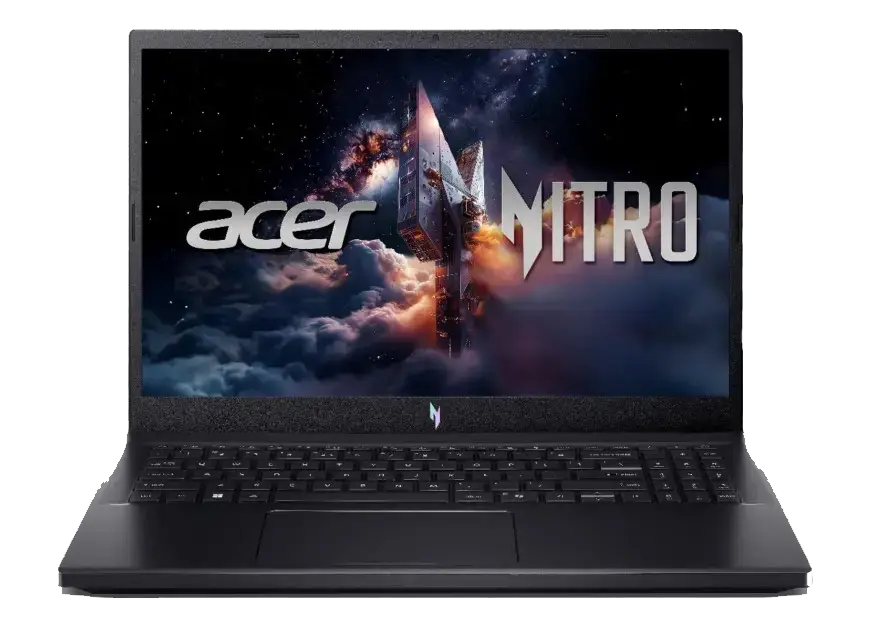
Two Acer Nitro V15 laptops sit next to each other on Mercado Livre and look almost identical: same 2.11 kg plastic chassis, same 15.6-inch 165Hz screen, same RTX 4050 with 6GB of VRAM. One of them is a Core i7-13620H with 8GB of RAM and Linux on the drive. The other, the ANV15-52-51E4 reviewed here, is a Core i5-13420H with 16GB of DDR5 and Windows 11 Home already installed, and it costs more. The whole review comes down to whether that gap is worth paying, and the honest answer is that this is the configuration most buyers should take, because it is the only one of the two you can use as it ships.
Acer Nitro V15 in 30 Seconds
- What it is. A 2.11 kg entry-level gaming laptop, model ANV15-52-51E4, with an Intel Core i5-13420H (8 cores / 12 threads, 4 Performance + 4 Efficient, up to 4.60 GHz, 12 MB Smart Cache, 45W base / 115W max turbo), an NVIDIA GeForce RTX 4050 Laptop GPU with 6GB GDDR6 at 75W, 16GB of DDR5-5200, a 512GB NVMe SSD, Wi-Fi 6, Thunderbolt 4, HDMI 2.1, gigabit Ethernet and a 15.6-inch 1080p IPS panel at 165Hz. Listed at R$ 6,935.
- "Is the i5-13420H enough?", the doubt that decides the purchase In games with a 75W RTX 4050 at 1080p the answer is yes, because the GPU is the limit in almost every title: independent FPS aggregates put the i5-13420H and the i7-13620H within about 1% of each other across more than 100 games. Where the i7 pulls away is outside games, roughly 25–30% more multi-threaded throughput (Cinebench R23 11,871 vs 15,176, PassMark 16,829 vs 23,250), double the L3 cache (12 MB vs 24 MB) and 4.9 GHz vs 4.6 GHz boost. If you game, edit short videos and study, the i5 is the right trade.
- 16GB of RAM, ready to go: the single biggest difference against the cheaper i7 listing, which ships 8GB on one module. Here you get 16GB of DDR5-5200 in two SO-DIMM sockets, expandable to 32GB. One check worth doing on arrival: open CPU-Z and confirm the modules run in dual channel (2×8GB). Some 16GB ANV15-52 builds leave the factory as a single 16GB stick; if yours does, adding a matched 16GB SO-DIMM is the only memory upgrade you will ever need.
- What the RTX 4050 really delivers: 2,560 CUDA cores, 6GB GDDR6 on a 96-bit bus, 35–115W configurable, and Acer allows it 75W here. LaptopMedia measured a stable 74W draw, a 2,459 MHz average clock, a 69°C GPU core over a full hour of gaming and 131 fps in Counter-Strike 2 at 1080p Very High. Independent testing puts competitive shooters above 100 fps and most single-player titles in the 45–70 fps band at 1080p Medium-to-High, with DLSS pushing demanding games past 60. This is a comfortable 1080p card, not an ultra card.
- The honest ceiling: 6GB of VRAM. DLSS Super Resolution and Frame Generation are supported and both lift frame rates a lot. But 6GB on a 96-bit bus is the smallest buffer in NVIDIA's Ada laptop family: keep textures at High instead of Ultra in the newest releases, because pushing past the limit produces irregular stutters that no settings slider fixes, and Frame Generation itself consumes VRAM.
- Windows 11 Home is included: this SKU ships with Windows, not Linux. It is the main reason it sits above the i7 listing in price, and it removes the single largest hidden cost of that machine. If you were budgeting for a Windows licence anyway, the "expensive" i5 is the cheaper laptop overall.
- The screen is a gamer's screen, not a colour screen. 165Hz, IPS, matte, Full HD, 300 nits, roughly 25–27ms response. Acer lists a 45% NTSC gamut, and independent units measured 54–60% sRGB with 347 nits of average brightness. Excellent for competitive play, not for colour grading or photo work.
- Cooling is this chassis' strong suit. LaptopMedia's one-hour stress test found no clock drop, 69°C average GPU temperature and 74W sustained draw; Canaltech's month-long use of a Nitro V15 never exceeded 71°C in games. The cost is noise: Notebookcheck measured 33 dB(A) in Silent, 45 in Balanced, 52 in Performance and 55 dB(A) in Turbo.
- Battery and ports, honestly: a 57Wh pack (some ANV15-52 regions ship 76Wh, check the listing) that reviewers measure at under 5 hours of light use and 1–2 hours of gaming. In exchange you get Thunderbolt 4, HDMI 2.1, three USB-A ports with one always-on, gigabit RJ-45 and Wi-Fi 6, a port list most laptops at this price cut down.
- Buy it if you want real 1080p gaming above 60 fps, 16GB of RAM and Windows already installed, on a laptop you can upgrade twice. Skip it if you need a colour-accurate display, all-day battery, silent fans, or heavy multi-thread work, an i7 or a desktop tower serves you better.
Full Specification Table. Acer Nitro V15 ANV15-52-51E4
| Component | Specification (Acer official) | What it means for you |
|---|---|---|
| Model | ANV15-52-51E4, black; the equivalent international build carries Acer part number NH.QUAEK.003 | Match the full code when comparing listings. Acer reuses the ANV15-52 name across very different configurations, including 144Hz, RTX 3050, RTX 5050 and Linux variants |
| Processor | Intel Core i5-13420H, 13th gen (Raptor Lake-H), 8 cores (4 Performance + 4 Efficient) / 12 threads, up to 4.60 GHz (P-cores), 12 MB Smart Cache, 45W base / 115W max turbo, Intel 7 | Enough CPU for 1080p gaming plus multitasking; in games the GPU, not this chip, is the limit |
| Graphics | NVIDIA GeForce RTX 4050 Laptop GPU: 2,560 CUDA cores, 6GB GDDR6, 96-bit, 194 AI TOPS, boost up to 1695 MHz, 35–115W configurable (75W in this chassis), Ada Lovelace, DLSS Super Resolution + Frame Generation, NVENC; Intel UHD integrated graphics | Confident 1080p High card with DLSS; 6GB of VRAM and a 96-bit bus are the hard limits on texture detail |
| Memory | 16GB DDR5 up to 5200 MHz, 2 SO-DIMM slots, expandable to 32GB (16GB per module) | Ships usable: no immediate RAM purchase. Confirm dual channel with CPU-Z; one socket may already be free |
| Storage | 512GB NVMe SSD, PCIe 4.0 x4, M.2 2280 + one free M.2 2280 slot | Fast drive plus room for a second one without replacing anything, rare at this price |
| Display | 15.6" IPS LED, 1920x1080, 16:9, 165Hz, 300 nits, 1000:1 contrast, ~25–27ms response, 45% NTSC gamut, Acer ComfyView matte coating, 85° viewing angle | The 165Hz refresh is the win over cheaper 144Hz machines; colour coverage is the cost of the price |
| Ports | 1 × Thunderbolt 4 / USB-C (DisplayPort alt mode), 3 × USB-A 3.2 Gen 1 5Gbps (one always-on), HDMI 2.1, RJ-45 1Gbps, 3.5mm combo audio, Kensington lock | Thunderbolt 4 at this price is rare and useful for docks, external storage and a second high-refresh monitor |
| Wireless and network | Wi-Fi 6 (802.11ax) dual-band 2x2 MU-MIMO, Bluetooth 5.1+, Gigabit Ethernet, Wake on LAN | No dongle needed for online gaming or a controller |
| Keyboard and touchpad | Backlit ABNT2 membrane keyboard, single-colour backlight, dedicated numeric keypad, NitroSense key, Copilot key; multi-gesture Precision touchpad | Brazilian layout plus a numpad and quick fan control, a genuine daily-use win over ultrabooks |
| Audio and camera | 2 × 2W stereo speakers with DTS:X Ultra, 2 × microphones, 720p webcam with temporal noise reduction | Fine for calls and classes; use headphones for games, reviewers are unanimous on that |
| Security | BIOS password, Kensington lock, firmware TPM (fTPM) | No fingerprint reader and no physical camera shutter on this configuration |
| Battery and charger | 57Wh lithium-polymer (some regional ANV15-52 builds carry a 76Wh pack); 135W external adapter | Designed to game plugged in; the battery is for classes, meetings and travel |
| Size and weight | 362.3 × 239.9 × 23.5 mm; 2.11 kg (4.66 lb) | One of the lighter 15.6-inch gaming laptops, realistic for a university bag or a commute |
| Operating system | Windows 11 Home. Included | The headline difference against the cheaper Linux SKU; no licence to buy, no install on day one |
| Warranty | 12-month manufacturer warranty (Brazil) | Standard for the category; keep the invoice for Acer Brazil service |
| Price at time of writing | R$ 6,935 on Mercado Livre, against R$ 8,299.90 on Brazilian price comparison sites for the same ANV15-52-51E4 | Roughly 16% below the market average for the SKU, and roughly R$ 1,045 above the 8GB/Linux i7 variant |
The RTX 4050 at 75W: What the Measurements Say
The most important number on this laptop is not in the spec sheet, it is the 75W power limit Acer gives the GPU. Laptop GPUs are sold as a range, not a fixed chip: the RTX 4050 Laptop GPU can draw anywhere from 35W to 115W according to NVIDIA's own specification, and the same card in a 45W laptop is measurably slower than the same card here. Tom's Hardware put this chassis head to head against the 45W RTX 4050 in the MSI Cyborg 15 and the Nitro won comfortably, while noting that machines with a 100W-or-higher RTX 4060 were clearly faster still. LaptopMedia, testing the ANV15-52 directly, confirmed the headroom is well used: an average clock of 2,459 MHz, an average draw of 74W, and over a full hour of gaming a GPU core peaking at 71°C with memory at 92°C, no throttling to report.
In frame-rate terms this is a genuine 1080p card. LaptopMedia recorded 131 fps in Counter-Strike 2 at 1080p Very High, exactly the kind of number a 165Hz panel exists to show: and 122 fps in Shadow of the Tomb Raider at 1080p Medium. Tom's Hardware averaged 53.56 fps across fifteen consecutive ray-traced Metro Exodus runs with minimal variance, which matters more than a headline peak: your 1% lows stay close to your average. PCWorld, testing the i5-13420H configuration specifically, scored 7,771 in 3DMark Time Spy and 105 fps in Shadow of the Tomb Raider at 1080p Highest. Independent RTX 4050 testing puts competitive shooters above 100 fps at 1080p High and most single-player titles in the 45–70 fps band at Medium-to-High, with DLSS Quality lifting demanding releases comfortably past 60.
The ceiling you cannot upgrade is the 6GB of VRAM on a 96-bit bus, the narrowest memory interface in NVIDIA's Ada laptop line. At 1080p Medium and High it is enough. Ultra textures plus ray tracing in the newest UE5-era releases cross the limit, and the symptom is not a lower average but memory spill-over into system RAM and irregular stutters. Two habits solve almost all of it: keep texture quality at High, and remember Frame Generation is not free. It consumes VRAM itself. If you want the same GPU with less ceiling anxiety, the step up is an RTX 4060 or RTX 5060 laptop with 8GB.
The i5-13420H vs the i7-13620H: Where the Difference Actually Shows
This is the comparison every shopper opens before buying a Nitro, so here are the numbers rather than an opinion. Both are 13th-gen Raptor Lake-H chips running at 45W base and 115W turbo in this chassis. The i7 has two extra Performance cores, four extra threads, double the L3 cache and a 300 MHz higher boost. In synthetic workloads that gap is real and consistent. In games, with a 75W RTX 4050 driving a 1080p panel, it mostly is not, the graphics card is already the limiting component in nearly every title, and aggregated FPS data across more than 100 games puts the two chips within about 1% of each other.
| Measure | Core i5-13420H (this laptop) | Core i7-13620H | What it changes |
|---|---|---|---|
| Cores / threads | 8 / 12 (4P + 4E) | 10 / 16 (6P + 4E) | Renders, compiles and heavy exports finish noticeably sooner on the i7 |
| Boost / cache | 4.60 GHz / 12 MB L3 | 4.90 GHz / 24 MB L3 | The i7 holds up better in CPU-bound games and large open worlds |
| Cinebench R23 multi-core | 11,871 points (Notebookcheck) | 15,176 points | About 28% more multi-thread performance for the i7 |
| Geekbench 6 multi-core | ~9,145 points | ~12,296 points | Same story: parallel workloads favour the i7 |
| PassMark CPU rating | 16,829 | 23,250 | Aggregate of thousands of submissions; 28% apart |
| Gaming with a 75W RTX 4050 | Within roughly 1% of each other across 100+ games | The GPU sets the frame rate in almost every title | |
| What you also get here | 16GB of DDR5 + Windows 11 Home | 8GB + Linux on the competing listing | The i5 package is the one that works out of the box |
The practical conclusion: if your workload is gaming, streaming, studying, browsing with dozens of tabs and light video editing, the i5 configuration is the better buy because its RAM and operating system are already correct. Choose the i7 only if you render, compile, run virtual machines or play heavily CPU-bound simulation and strategy titles, and remember that the i7 listing you will find next to this one needs a RAM module and a Windows licence before it does anything.
Expected Performance by Game Type
| What you play | Settings | Expected result at 1080p |
|---|---|---|
| Competitive shooters (CS2, Valorant, Fortnite) | High to Very High | Excellent, 131 fps in CS2 on Very High per LaptopMedia; the 165Hz screen is genuinely used |
| Racing and sports (F1 24, Forza Horizon) | Medium-High with DLSS | Around 100–144 fps, smooth enough to feel the 165Hz panel |
| Current AAA action (Cyberpunk 2077, Black Myth: Wukong) | High without ray tracing | Around 60–65 fps, the practical default for this card |
| Ray-traced AAA | High textures + DLSS Quality + Frame Generation | Playable and often above 60, but watch VRAM: textures High before enabling Frame Generation |
| Older or optimised AAA (Shadow of the Tomb Raider, Metro Exodus) | High to Ultra | Comfortable 60–105 fps, 105 fps in Shadow of the Tomb Raider at Highest per PCWorld |
| 1440p or 4K | Any | Not the target for this class of GPU, stay on the native 1080p panel |
| Creative work (short video edits, 3D, CAD for students) | - | Fine for school and light editing; 16GB helps here. But the 45% NTSC panel rules out colour-critical work |
The 16GB Question: What to Confirm in the First Ten Minutes
Memory is where this listing wins against its sibling, so it deserves a precise answer rather than a marketing line. Acer documents the ANV15-52 family with two SO-DIMM sockets and a 32GB ceiling, and this configuration is sold with 16GB of DDR5-5200, double the 8GB module of the cheaper i7 variant. Why does that matter so much? Because Windows 11 alone consumes 2.5–3.5GB before you launch anything, and current AAA titles commonly allocate 8–15GB more; on a single 8GB stick the system pages to its SSD and produces irregular micro-stutters instead of a clean frame-rate drop. That is the difference between smooth and stuttery, and this laptop skips the problem entirely.
One verification is worth the thirty seconds it takes: open CPU-Z's SPD and Memory tabs (or Task Manager → Performance → Memory) and confirm that two modules are running in dual channel. Acer's 16GB ANV15-52 builds are commonly 2×8GB, but some factory builds use a single 16GB stick with one socket left free: which works, but leaves bandwidth on the table. If yours is single-stick, the fix is one matched 16GB DDR5-5200 SO-DIMM, taking you to 32GB in dual channel. If it is already 2×8GB, you would replace both modules to reach 32GB. Either way the machine is upgradeable twice, which is more than most laptops at this price offer.
Upgrade Path: Memory and Storage Are Both Open
Most gaming laptops at this price give you one thing to change. This one gives you two. The 512GB PCIe 4.0 x4 M.2 2280 drive occupies the first socket and a second M.2 2280 slot is left empty, so total storage reaches roughly 1.5TB by adding one drive instead of replacing anything, which matters when a single modern game can take 120GB. Memory sits in two sockets under an EMI shield; LaptopMedia's disassembly guide for the ANV15-52 puts it at eleven Phillips screws and a straightforward clip-release for the modules.
What you cannot change is worth knowing: the processor is soldered, as on every modern laptop; there is no SD card reader; and there is no user-selectable MUX switch on this family, the laptop runs its Optimus hybrid graphics routing rather than forcing the discrete GPU. None of that matters at 1080p; all of it is worth remembering if you plan to drive an external high-refresh monitor and want to bypass hybrid graphics.
The Display: 165Hz Is the Win, 45% NTSC Is the Cost
Acer's specification for this SKU lists a 15.6-inch IPS panel at 1920x1080, 165Hz, 300 nits, 1000:1 contrast, approximately 25–27ms response, matte ComfyView coating and 45% NTSC colour gamut. Split that into two verdicts. For gaming it is good: 165Hz is a real advantage over the 144Hz and 60Hz panels on cheaper machines, the matte finish kills reflections, and IPS keeps viewing angles stable for a shared screen. Independent testing measured 347 nits of average brightness, better than most rivals at this price, and LaptopMedia found the panel completely PWM-free, which is easier on the eyes over long sessions.
For anything colour-critical it is not. The same tests put colour coverage at 54–60% sRGB, and LaptopMedia calls coverage this model's most significant compromise, describing the screen as unusable for creative work. If you edit photos, grade video or design in colour, budget for a small colour-accurate external monitor. That is cheaper than finding the right notebook.
Cooling, Noise and NitroSense
The thermal story is one of this laptop's quiet strengths. LaptopMedia's one-hour GPU stress test found the RTX 4050 completely stable with no meaningful clock drop, and month-long real-world use of a Nitro V15 recorded gaming temperatures never above 71°C with the GPU around 65°C during play. Two fans and a 23.5mm-thin chassis do the work, and the result is genuinely cool for a gaming laptop, the exact opposite of what buyers worry about at this price.
Noise is the trade-off, and it is managed by NitroSense, Acer's control utility, which sets power limits and fan behaviour across four profiles. Notebookcheck measured the ANV15-52 in Cyberpunk 2077 and reported:
| NitroSense mode | Noise measured | Use it for |
|---|---|---|
| Silent | 33 dB(A) | Classes, meetings, study, travel, genuinely quiet |
| Balanced | 45 dB(A) | The sensible daily default, including most games |
| Performance | 52 dB(A) | Heavy AAA sessions with headphones on |
| Turbo | 55 dB(A) | Benchmarks and the last few percent of frame rate |
Reviewers across the English-language press are consistent that the fans are the loudest part of the package, and that Performance and Turbo are audible across a room. Balanced is the right default. One practical quirk worth knowing: keep drivers, BIOS and NitroSense updated through Acer Care, several owners reporting low Time Spy scores on Reddit had simply never enabled Performance mode or were running on battery.
Battery Life, Build and Everyday Use
The 57Wh battery is the honest weak point, and it is shared across the family, some regional ANV15-52 builds carry a larger 76Wh pack, so it is worth confirming which one your listing ships. Acer's published V 15 spec sheets quote up to 8 hours, with a MobileMark figure of up to 6 hours appearing on some regional sheets; independent testing landed lower, at under 5 hours of light use. Gaming on battery gives one to two hours, and maximum performance is designed around being plugged into the 135W adapter. That is normal for the category, but if you need a machine that finishes a flight with work done, this is not it.
Day to day, the ergonomics are better than the spec list suggests. The ABNT2 keyboard has a dedicated numeric keypad, which students, accountants and spreadsheet users notice immediately, plus a NitroSense key for fan control and a Copilot key. The single-colour backlight keeps it readable at night without RGB theatre. At 2.11 kg and 23.5 mm it is one of the genuinely portable 15.6-inch gaming laptops. Audio is average: two 2W speakers with DTS:X Ultra are fine for calls, and reviewers are unanimous that a headset is required for games. The 720p webcam is adequate for classes and meetings, but there is no physical privacy shutter and no fingerprint reader.
Windows 11 Included: The Difference That Justifies the Price
This is the part of the purchase that is easy to undervalue. The competing i7 listing costs about R$ 5,889.99 and arrives with 8GB of RAM and a Linux image instead of Windows. Buying your way out of that means a matched 8GB DDR5 SO-DIMM and a Windows licence: and once both are added, the "cheaper" laptop lands at or above the R$ 6,935 of this configuration, while still having taken an evening of setup and a memory upgrade to get there.
Linux on a gaming laptop is not a bad thing: Proton runs a large part of the Windows catalogue at near-native speed and the hardware is well supported. But it is a choice, not a default, and most buyers of a first gaming laptop do not want to make it on delivery day. Here it is already made: Windows 11 Home, drivers, NitroSense, and a 16GB configuration that does not need opening.
Price and How It Compares
At R$ 6,935 this listing sits about 16% below the R$ 8,299.90 that Brazilian price comparison sites show for the same ANV15-52-51E4, which makes it a straightforwardly good moment to buy. The more useful comparison is internal: roughly R$ 1,045 separates it from the 8GB/Linux i7 variant. Spend that difference and you get double the RAM and a Windows licence included. The two upgrades that machine needs before it is usable, plus a keyboard layout and adapter already suited to Brazil.
Judge any alternative with three corrections applied: does it already have 16GB in dual channel, does it already have Windows, and does it have a second SSD slot. This configuration answers yes, yes and yes. What it does not have, and what you should not pretend it has, is a colour-accurate screen, a long battery, or a GPU with more than 6GB of VRAM. Those are the honest limits of the R$ 6,935 class, and knowing them is the difference between a laptop you are happy with for three years and one you regret by month four.
Pros and Cons
Pros
- 16GB of DDR5-5200 already installed, no RAM purchase on day one, unlike the 8GB i7 sibling
- Windows 11 Home included, so the licence cost is not hiding behind the price
- RTX 4050 allowed 75W, measured at 74W average draw, 2,459MHz sustained and a 69°C GPU core over a full hour of gaming
- 131 fps in Counter-Strike 2 at 1080p Very High, so the 165Hz panel is genuinely usable in competitive titles
- Consistent frame times: 53.56 fps average across fifteen consecutive ray-traced Metro Exodus runs
- Cool and stable thermals, under 71°C in real games during month-long testing
- Two SO-DIMM sockets and two M.2 sockets, so both memory and storage are upgradeable
- Thunderbolt 4, HDMI 2.1, three USB-A ports, gigabit Ethernet and Wi-Fi 6 at this price point
- Light for the category at 2.11 kg and 23.5 mm, with an ABNT2 backlit keyboard and numeric keypad
- About 16% below the market average price for the same model number in Brazil
Cons
- 6GB of VRAM on a 96-bit bus means Ultra textures plus ray tracing spill into system memory and stutter
- Display covers roughly 45% NTSC (54–60% sRGB measured), not suitable for colour-critical work
- 57Wh battery delivers under 5 hours of light use and 1–2 hours of gaming; some regions get 76Wh
- Fan noise of 45 dB in Balanced and 52–55 dB in Performance/Turbo is the loudest part of the package
- The i5-13420H is about 25–30% slower than the i7-13620H in heavily multi-threaded work
- 512GB of storage fills up fast with modern games, budget for the second SSD
- No fingerprint reader, no physical webcam shutter, no SD card reader and no user-selectable MUX switch
- 720p webcam and fully plastic chassis, as expected at this tier
- Acer reuses the ANV15-52 name across many configurations. Check the full code before comparing prices
Frequently Asked Questions
Is the Core i5-13420H good enough for gaming, or should I take the i7?
For gaming, the i5 is enough and you will not feel cheated. Both chips run at 45W base and 115W turbo in this chassis, and in games with a 75W RTX 4050 at 1080p the graphics card is the limiting component in nearly every title, aggregated data across more than 100 games puts the i5-13420H and the i7-13620H within about 1% of each other. The i7's real advantage is outside games: 6 Performance cores instead of 4, 16 threads instead of 12, double the L3 cache and roughly 25–30% more multi-threaded throughput (Cinebench R23 11,871 vs 15,176). Choose the i5 if you game, stream, study and edit short videos; choose the i7 if you render, compile, run virtual machines or play CPU-heavy simulation and strategy titles.
Does this model come with Windows installed?
Yes. Windows 11 Home is included on the ANV15-52-51E4. This matters because the cheaper Acer Nitro V15 listing you will see next to it (the Core i7 with 8GB) ships with a Linux image and no Windows licence, which is a large part of why it costs less. On this configuration there is nothing to buy and nothing to install: it arrives with the operating system, the Acer and NVIDIA drivers and NitroSense ready. If you prefer Linux, you can always install it: but here that is your choice rather than a requirement.
Is the 16GB of RAM in dual channel, and can I upgrade it?
Two sockets, 32GB ceiling, 16GB as sold, and one quick check on arrival. Acer's ANV15-52 family uses two SO-DIMM slots supporting up to 16GB per module, and 16GB builds are commonly 2×8GB running in dual channel from the factory. Some builds use a single 16GB stick with the second socket free. Open CPU-Z or Task Manager → Performance → Memory to confirm: if two modules are listed and the controller reads dual, you are done. If it is a single stick, one matched 16GB DDR5-5200 SO-DIMM takes you to 32GB in dual channel, and either way, you never had to buy memory to start using the laptop, which is exactly what the 8GB sibling requires.
Is the RTX 4050 with 6GB of VRAM good enough in 2026?
At 1080p, yes, with one rule. NVIDIA's official figures are 2,560 CUDA cores, 6GB of GDDR6 on a 96-bit bus and a configurable 35–115W range; Acer allows 75W here, which is the upper-middle of that range and measurably faster than a 45W version of the same card. Independent testing puts competitive shooters above 100 fps at 1080p High, most modern single-player titles at 45–70 fps at Medium-to-High, and DLSS Quality plus Frame Generation pushes the demanding ones past 60. The rule is textures: 6GB is the smallest buffer in the Ada laptop family, so keep them at High rather than Ultra in the newest releases, and remember Frame Generation consumes VRAM itself. If your priority is maximum settings for years without thinking about it, target an RTX 4060 or RTX 5060 laptop with 8GB.
How good is the 165Hz screen, really?
Excellent for gaming, weak for colour work. Acer lists 1920x1080 IPS at 165Hz, 300 nits, 1000:1 contrast and roughly 25–27ms response with a matte ComfyView finish. A solid competitive panel that shows the difference against 144Hz and 60Hz machines, and one measured at 347 nits of average brightness with no PWM flicker. The limitation is colour: 45% NTSC by Acer's specification, with independent units measuring 54–60% sRGB. Fine for games, movies and office work; not for photo editing, video grading or design. If that is your job, add a small colour-accurate external monitor to the budget instead of avoiding the laptop.
How long does the battery last, and can I game unplugged?
Plan for the charger. The configuration carries a 57Wh battery (some regional ANV15-52 builds carry 76Wh, check the listing), Acer's spec sheets quote up to 8 hours with a MobileMark figure of up to 6 hours on some regions, and independent testing measured under 5 hours of light use. Gaming unplugged gives roughly 1–2 hours and performance is designed around the 135W adapter being connected. Use Silent mode when travelling with it in a bag, and Balanced or Performance at a desk.
How loud are the fans?
Louder than you would like and fully under your control through NitroSense. Notebookcheck measured the ANV15-52 in Cyberpunk 2077 at 33 dB(A) in Silent, 45 dB(A) in Balanced, 52 dB(A) in Performance and 55 dB(A) in Turbo. Silent is genuinely quiet and fine for study; Balanced is the sensible default; Performance and Turbo are audible across a room, so use headphones. The temperatures themselves are a strength, 69°C average GPU over an hour of gaming, so the noise is the compromise, not the cooling.
Can I upgrade the RAM and the SSD?
Both, and it is one of the machine's best features. Memory sits in two SO-DIMM sockets supporting up to 32GB, and storage has two M.2 2280 sockets: the shipped 512GB PCIe 4.0 drive in the first, an empty slot in the second, so you add a drive rather than replacing one. LaptopMedia's ANV15-52 disassembly guide puts the job at eleven Phillips screws with clips holding the memory under an EMI shield. What you cannot upgrade is the processor, which is soldered, and there is no SD card reader. Twelve-month manufacturer warranty applies in Brazil.
Is it worth buying instead of the cheaper i7 Nitro V15 with 8GB and Linux?
Usually yes, and the maths is simple. The i7 listing is around R$ 5,889.99 with 8GB on a single module and Linux instead of Windows. To make it equivalent you add a matched 8GB DDR5 SO-DIMM and a Windows licence, which together erase the difference in price, and you still spend an evening installing the OS and opening the chassis. The i5 configuration here arrives with 16GB and Windows 11 Home already correct, plus the same 75W RTX 4050, the same 165Hz panel, the same two memory sockets and two SSD sockets. Take the i7 only if its lower price matters more to you than time and convenience, and you were going to install Linux anyway.
What should I check before clicking buy on a Nitro V15 listing?
Check the full model code, not the product name. Acer uses the ANV15-52 designation for many different configurations, different processors, different GPUs (RTX 3050, 4050, 5050, 5060), different panels (144Hz, 165Hz, 180Hz) and different operating systems. For this listing the code is ANV15-52-51E4, with an i5-13420H, 16GB of DDR5-5200, a 512GB SSD, an RTX 4050, a 165Hz panel and Windows 11 Home. Then confirm three things: that Windows is listed (not Linux), that the memory is 16GB and how many modules it uses, and whether the battery in your region's build is the 57Wh or the 76Wh pack. Finally compare total corrected prices, laptop plus any RAM and licence a rival still needs. Against machines that are ready out of the box.
Check Today's Price
Live pricing from trusted sellers on Mercado Livre. Acer Nitro V15 ANV15-52-51E4, brand-new, boxed, with Windows 11 Home, the 135W adapter and a 12-month manufacturer warranty.
Check today's price View on Mercado LivreAs an affiliate, we may earn a commission when you buy through our links, at no extra cost to you. It never changes our opinion.